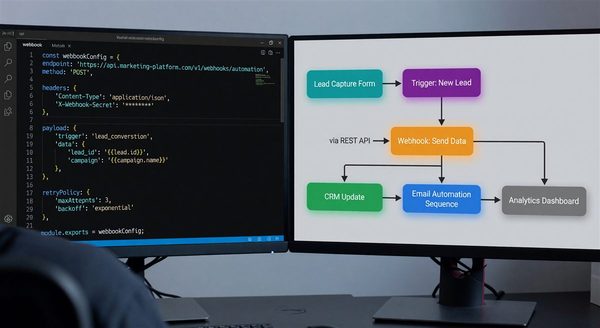
Most load tests for a store cover the storefront: product pages, cart, checkout. The pipeline behind it, which turns orders into CRM updates, email triggers, and ad conversions, gets tested by the holiday weekend itself. That is the wrong place to learn that your webhook handler does a database write before it responds, or that your sync job shares a rate limit with a nightly export.
This is a plan for testing that layer before late November, using the delivery rules and limits the vendors themselves publish.
Know the contract you are testing against
A load test is only meaningful against numbers that exist. Collect these first, from current vendor documentation, and keep them in the test plan.
Webhook senders
- Shopify documents a one-second connection timeout and a five-second timeout for the whole request. It retries eight times over the following four hours, and after eight consecutive failures a subscription configured through the Admin API is deleted. Shopify also states that delivery is not guaranteed and does not guarantee ordering within or across topics for the same resource.
- Stripe tells you to return a 2xx before any complex logic, to process events through an asynchronous queue, and warns that a large spike in deliveries can overwhelm endpoint hosts. In live mode it retries for up to three days with exponential backoff, and it does not guarantee event order.
- HubSpot’s webhooks retry failed notifications up to ten times over 24 hours, treat a response slower than five seconds as a timeout, and apply a default concurrency limit of ten in-flight requests per installing account.
API limits on the outbound side
- HubSpot’s burst limit for privately distributed apps is 100 requests per 10 seconds on Free and Starter, 190 on Professional and Enterprise, and 250 with the API Limit Increase add-on. Daily limits are shared across private apps in an account: 250,000, 625,000, or 1,000,000 depending on tier. Exceeding either returns a 429.
- Klaviyo applies burst (one-second) and steady (one-minute) windows per tier. For example, the S tier is 3 per second and 60 per minute, and L is 75 per second and 700 per minute. On a 429 it returns a
Retry-Afterheader, and retries before that window expires will fail again.
Queue behavior
- Amazon SQS standard queues deliver at least once, may deliver a message more than once, and can deliver out of order. The default visibility timeout is 30 seconds; a message not deleted before it expires becomes visible again. Standard queues have an approximate limit of 120,000 in-flight messages, after which receives return an
OverLimiterror on short polling.
These are the failure surfaces. Each of the sections below targets one.
Test the front door: ack fast, do nothing else
The receiver’s only job is to verify the signature, write the raw event to durable storage or a queue, and return a 2xx. Test that it stays that way under load.
Use an open-model load generator, one that starts requests at a target rate whether or not earlier ones finished. k6’s ramping-arrival-rate executor works this way: you define stages of target iterations per time unit, and it starts iterations regardless of how fast responses come back. That matters because a closed model, with a fixed pool of virtual users each waiting for a response, slows its own request rate as your endpoint slows and hides the collapse. Real senders do not wait politely for you.
Measure the 99th percentile of response time, not the mean, against the sender’s limit. If Shopify cuts the connection at five seconds, a handler whose p99 reaches four seconds under test will fail in production the moment a cold start or a slow database connection stacks on top. Set your own internal budget well below the sender’s ceiling, and fail the test when p99 crosses it.
Ramp past your forecast. If last year’s peak was a given rate, test at a multiple of it, and keep going until something breaks. Knowing which component breaks first matters more than passing.
Test the queue: duplicates, ordering, and the poison message
Queues turn a spike into a backlog. That is the point, but it moves the failure from the front door to the workers.
Duplicates
Because standard queues can deliver a message more than once, and because senders retry on any non-2xx or slow response, every consumer must be idempotent. Shopify documents X-Shopify-Webhook-Id for identifying duplicate deliveries, and Stripe says to log processed event IDs and skip repeats. In the test, replay the same events deliberately, at a meaningful fraction of volume, and assert that downstream state matches a single delivery: one CRM update, one welcome email, one conversion upload.
Ordering
Do not rely on arrival order. Shopify suggests using timestamps such as the X-Shopify-Triggered-At header or the payload’s updated_at to sort events, and Stripe says not to use its created field to decide order, since distinct events can share a timestamp. Shuffle the order of a captured event stream in the test and verify that final state is the same. An “order updated” event applied before “order created” is the classic failure.
Visibility timeout
If a worker takes longer than the visibility timeout, the message reappears and a second worker starts the same job while the first is still running. Under load, downstream calls slow down, jobs take longer, and this starts happening without any code change. In the test, slow your downstream stub deliberately and watch for duplicate in-flight processing. Either size the timeout against p99 job duration or extend it while working, and configure a dead-letter queue so a message that keeps failing stops circulating.
Test the outbound side: your own rate limiter
A backlog drains as fast as your workers can call vendor APIs, which is limited by the vendor’s rate limits and not by your queue. Build the limiter first and test that.
- Budget by window. Honor both of Klaviyo’s windows, not just one, and HubSpot’s ten-second burst as well as its daily cap. A worker fleet that scales out during the backlog will multiply request rate unless the limiter is shared across it.
- Respect
Retry-After. Klaviyo says retries before the window expires always fail, so a worker that retries immediately only burns its budget. Use exponential backoff with jitter, and prefer the server’s stated wait when it provides one. - Prefer batch endpoints. HubSpot’s own guidance for approaching limits is to use batch APIs, cache results, and use webhooks, which do not count toward API limits.
- Check shared budgets. On HubSpot, daily limits are shared across private apps in the account, so your peak-season sync competes with every other integration, including ones owned by other teams. Find out what else draws on the same budget before the test, not during the incident.
Then run the test that matters: stop the downstream API entirely, or return 429s from the stub, for a sustained period while the inbound rate stays high. Watch queue depth, oldest-message age, and worker behavior when the vendor recovers. A pipeline that drains the backlog in a controlled way is healthy. One that floods the vendor the moment it returns, and trips the limit again, is not.
Reconcile, because delivery is not guaranteed
Shopify’s documentation tells you to implement reconciliation jobs that periodically fetch data, because webhook delivery is not guaranteed. Include one in your test. Drop a percentage of events on purpose, then confirm that a scheduled job detects the gap and repairs it from the source API within a bounded time. Decide beforehand how stale a CRM record is allowed to be during the peak, and test against that number.
Before the freeze
Write down, for each pipeline stage, the sender’s timeout, your measured p99, the queue’s depth threshold, and the vendor’s limit. Run the failure tests above at least once with the on-call engineer who will carry the pager. Then freeze changes ahead of the peak and spend the remaining time on dashboards: queue depth, oldest message age, 429 rate, dead-letter count, and webhook error rate by sender. Those five numbers tell you within minutes which layer is in trouble.